Mepco Bill Online Check 2026 – Detailed Guide to Duplicate Electricity Bill Download
In Pakistan, managing utility bills digitally has evolved from an optional convenience to an essential daily requirement. MEPCO (Multan Electric Power Company) is the largest power distribution company in Pakistan in terms of geographical area, serving over 13 million electricity consumers across 13 districts of South Punjab. Whether you are a residential consumer in Multan, a commercial shopkeeper in Bahawalpur, or an agricultural tubewell owner in D.G. Khan, receiving your physical electricity bill on time can sometimes be delayed due to courier logistics or postal misplacement.
This comprehensive guide details everything you need to know regarding Mepco Bill online checking, downloading duplicate bills in high-resolution PDF format, understanding complex tariff calculations, identifying taxes, managing peak hour electricity usage, and registering complaints online without visiting physical division offices.
Quick Summary: To view or print your latest MEPCO electricity bill online, simply locate the 14-digit Reference Number from any previous hard copy of your bill, enter it into our bill search box above, and instantly get your full duplicate bill copy with due date and total amount.
What is MEPCO (Multan Electric Power Company)?
Multan Electric Power Company (MEPCO) was incorporated in 1998 as a public limited license holder company under the Companies Ordinance 1984. It operates under the administrative jurisdiction of the Ministry of Energy (Power Division) Government of Pakistan and receives power generation distribution from the Pakistan Electric Power Company (PEPCO) network via the Power Information Technology Company (PITC) database.
MEPCO is responsible for maintaining the power distribution network, grid stations, high voltage transmission lines, and billing services across the following Southern Punjab administrative districts:
- Multan District: (Multan Cantt, Shah Rukn-e-Alam, Gulgasht, Shujabad, Jalalpur Pirwala)
- Bahawalpur District: (Bahawalpur City, Ahmedpur East, Hasilpur, Yazman, Khairpur Tamewali)
- Dera Ghazi Khan (D.G. Khan): (City Division, Taunsa, Kot Chutta)
- Rahim Yar Khan: (Rahim Yar Khan City, Sadiqabad, Khanpur, Liaquatpur)
- Sahiwal District: (Sahiwal City, Chichawatni)
- Vehari District: (Vehari, Burewala, Mailsi)
- Muzaffargarh District: (Muzaffargarh City, Alipur, Jatoi, Kot Addu)
- Khanewal District: (Khanewal, Kabirwala, Mian Channu, Jahanian)
- Rajanpur, Layyah, Lodhran, Pakpattan, & Bahawalnagar Districts
Step-by-Step Guide: How to Check & Print MEPCO Bill Online
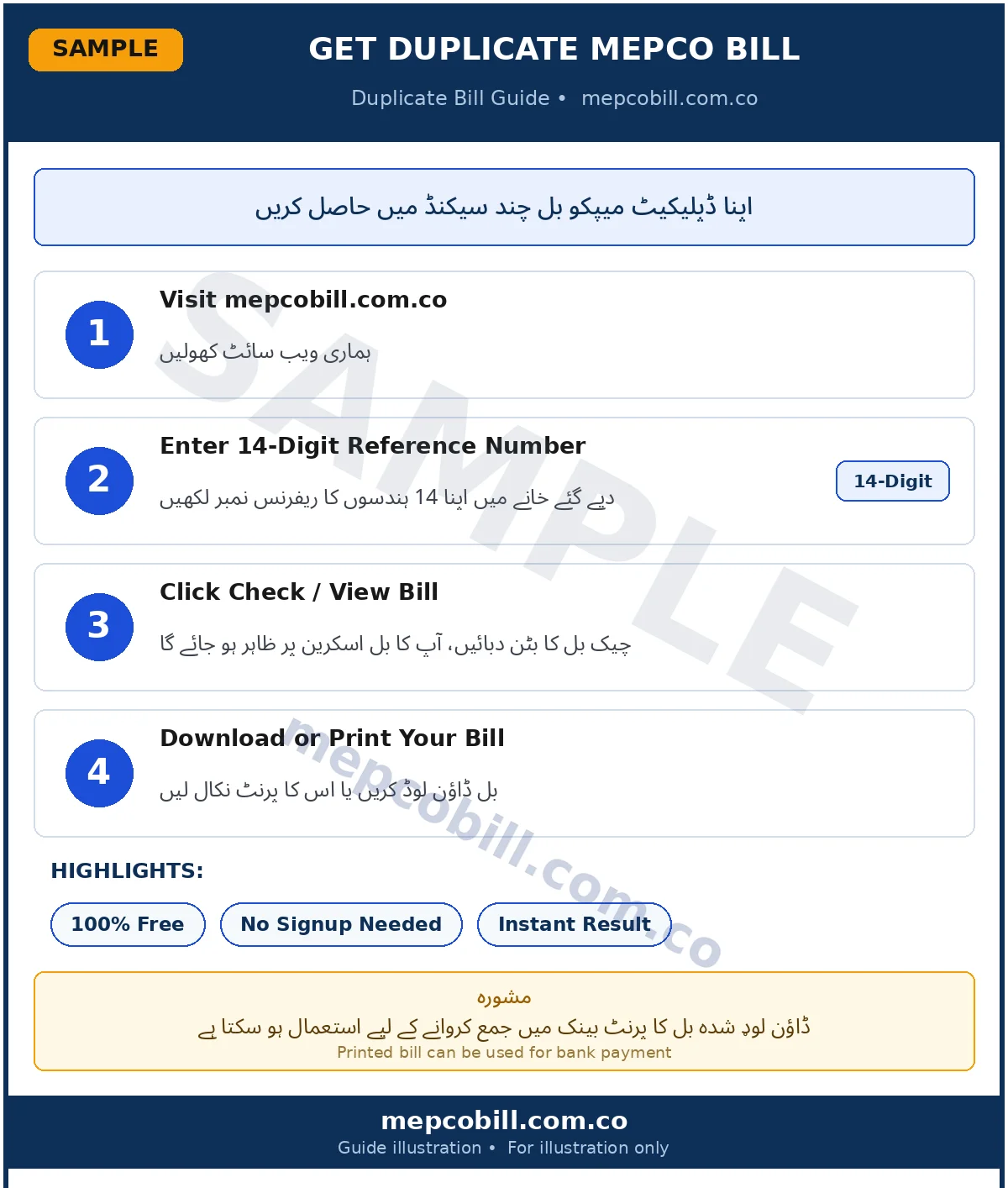
Checking your mepco duplicate bill online is a straightforward 4-step process. You do not need to register an account or pay any subscription fee. Follow these steps:
15151111234567).Understanding the Differences: Reference Number vs. Consumer ID
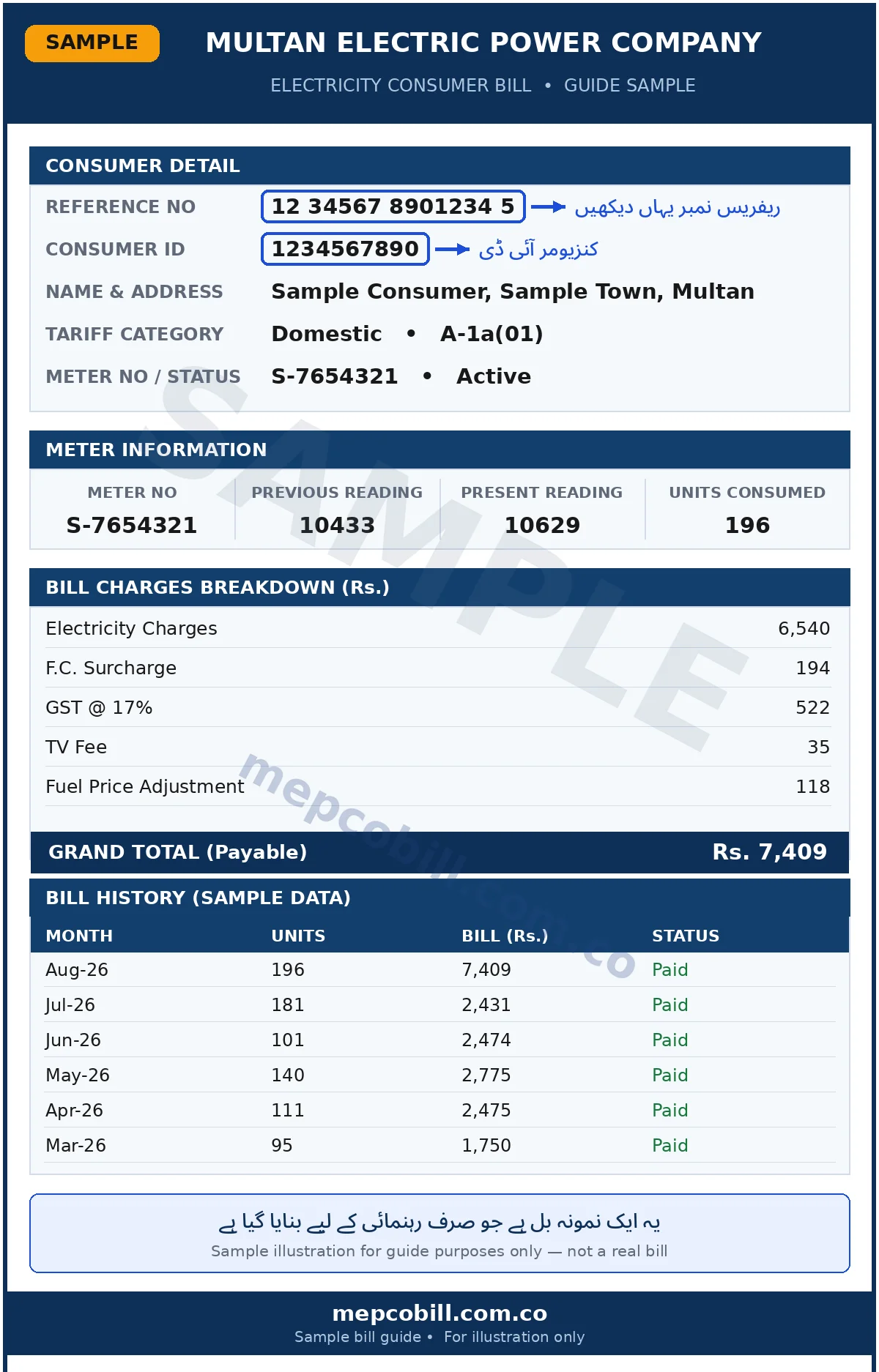
Many consumers confuse the 14-digit Reference Number with the 10-digit Consumer ID. Here is a clear comparison table to help you distinguish between the two numbers printed on your bill:
| Feature | Reference Number | Consumer ID |
|---|---|---|
| Digit Length | 14 Digits (Numeric + Batch code) | 10 Digits (Numeric) |
| Primary Usage | Online Bill Fetching & Banking Apps | Account Tracking & Office Records |
| Can change over time? | May change if Sub-division changes | Remains permanently fixed to customer |
NEPRA Tariff Rate Comparison Table 2026
NEPRA (National Electric Power Regulatory Authority) regularly adjusts per-unit electricity tariffs across domestic, commercial, and industrial categories. Below is the comprehensive tariff rate breakdown for 2026:
| Category | Unit Slab Range | Base Rate (Per Unit) |
|---|---|---|
| Protected Domestic | 1 – 100 Units | Rs. 7.74 / unit |
| Protected Domestic | 101 – 200 Units | Rs. 10.06 / unit |
| Unprotected Domestic | 1 – 100 Units | Rs. 16.48 / unit |
| Unprotected Domestic | 101 – 200 Units | Rs. 22.95 / unit |
| Unprotected Domestic | 201 – 300 Units | Rs. 27.14 / unit |
| Unprotected Domestic | 301 – 400 Units | Rs. 32.03 / unit |
| Unprotected Domestic | Above 700 Units | Rs. 42.72 / unit |
| Commercial Connection | Flat Tariff Rate | Rs. 38.50 / unit |
Detailed Explanation of MEPCO Bill Taxes & Surcharges (2026 Updated)
When reviewing your monthly MEPCO bill, you will notice several additional line items added to your base unit electricity cost. Understanding these charges helps in analyzing your electricity consumption expenditure:
1. Variable Energy Cost (Cost of Electricity)
This is the base price of electricity calculated by multiplying the number of kilowatt-hour (kWh) units consumed during the billing cycle by the applicable NEPRA tariff rate per unit.
2. Fuel Price Adjustment (FPA)
Fuel Price Adjustment (FPA) represents the variation in fuel costs incurred by power generation companies (GENCOs) to produce electricity. If fuel prices (such as imported coal, LNG, or furnace oil) rise globally, NEPRA approves a monthly FPA surcharge that is added to your bill 1 or 2 months later.
3. FC Surcharge (Financial Cost Surcharge)
The Financial Cost Surcharge is levied by the Federal Government at a uniform rate across all DISCOs in Pakistan to service the debt and interest liabilities of the power sector circular debt.
4. QTR Adjustment (Quarterly Tariff Adjustment)
Quarterly tariff adjustments account for seasonal variations, capacity payments to Independent Power Producers (IPPs), and transmission losses across each quarter of the financial year.
5. Government Taxes: GST, Electricity Duty, & TV Fee
- GST (General Sales Tax): Standard 18% tax applied to the sum of energy charges and fuel adjustments.
- Electricity Duty (ED): State duty charged at 1.5% of total variable electricity cost.
- PTV Fee: Fixed charge of Rs. 35 added to all domestic consumer bills (Rs. 60 for commercial consumers) to support Pakistan Television Corporation.
Protected vs. Unprotected Domestic Consumer Categories Explained
As per NEPRA tariff guidelines, domestic residential electricity consumers are divided into two distinct billing categories:
- Protected Consumer Category: Consumers whose monthly electricity consumption has remained at or below 200 units per month continuously for the last 6 consecutive months. Protected consumers receive subsidized slab rates and lower fixed charges.
- Unprotected Consumer Category: Consumers who exceed 200 units in any single month during the last 6 months. Once categorized as Unprotected, progressive higher tariff slabs apply across all unit brackets.
MEPCO Peak Hours Schedule 2026 – How to Reduce Your Bill
Electricity rates in Pakistan are variable based on peak demand hours. During peak hours, power generation grids operate at maximum capacity, resulting in higher per-unit rates. By shifting high-wattage appliance usage (such as air conditioners, water pumps, electric irons, and washing machines) to off-peak hours, households can reduce monthly bills by 20% to 35%.
The official MEPCO peak hour schedules are as follows:
- Summer Season (April to October): Peak Hours are active from 6:00 PM to 10:00 PM.
- Winter Season (November to March): Peak Hours are active from 5:00 PM to 9:00 PM.
Top 10 Energy Saving Tips for Pakistani Households
With rising per-unit rates, energy conservation is the most effective way to manage monthly electricity expenses. Here are 10 practical tips verified by energy auditors:
- Set Inverter AC Temperature to 26°C: Running your inverter air conditioner at 26 degrees Celsius reduces compressor workload, saving up to 25% electricity compared to running at 18°C.
- Switch to DC Inverter Fans & LED Lighting: Traditional ceiling fans consume 80-100 Watts, whereas modern DC Inverter fans consume only 30-35 Watts. Replacing incandescent bulbs with energy-efficient LED SMD lights saves massive power.
- Avoid Running Heavy Appliances During Peak Hours: Turn off water pumps, electric water heaters (geysers), washing machines, and irons during peak hours (6 PM to 10 PM in summer).
- Unplug Idle Electronics (Standby Load): Appliances like TVs, microwave ovens, and phone chargers continue to draw phantom power when plugged in. Always switch off main socket switches.
- Service Your AC Filters & Condenser Coils: Clean air filters every 2 weeks to ensure unrestricted airflow. Clogged filters force the AC compressor to draw higher current.
- Use Solar Energy & Net Metering: Installing On-Grid solar panels with green net-metering allows you to export excess daytime solar electricity back to the MEPCO grid, offsetting night consumption.
- Use Natural Daylighting: Keep curtains open during daytime to utilize daylight instead of turning on room lights.
- Insulate Windows & Doors: Prevent cool air leakage by installing rubber weatherstripping around doors and windows.
- Optimize Refrigerator Settings: Keep your refrigerator 3 inches away from walls for heat dissipation and avoid opening freezer doors repeatedly.
- Check Meter Wiring for Earth Leakages: Faulty home wiring or neutral earthing faults can cause continuous background unit consumption. Have an electrician audit your main breaker board.
How Solar Net Metering Works with MEPCO
Solar Net Metering is a billing mechanism that credits solar energy system owners for the electricity they add to the MEPCO power grid. Under NEPRA Net Metering Regulations 2015, any domestic, commercial, or agricultural consumer with a 3-phase connection can install solar panels (minimum 3kW up to 1MW capacity) and apply for a Bi-Directional (Green) Meter.
During daylight hours, excess solar units generated by your rooftop system flow back into the MEPCO grid. At the end of the monthly billing cycle, MEPCO calculates the net difference between consumed units from the grid and exported units to the grid. If exported units exceed consumed units, the financial credit is carried forward to your next monthly bill!
How to Pay Your MEPCO Bill Online in Pakistan
You no longer need to wait in long queues at Post Offices or Commercial Bank branches. You can pay your MEPCO bill 24/7 using digital payment channels:
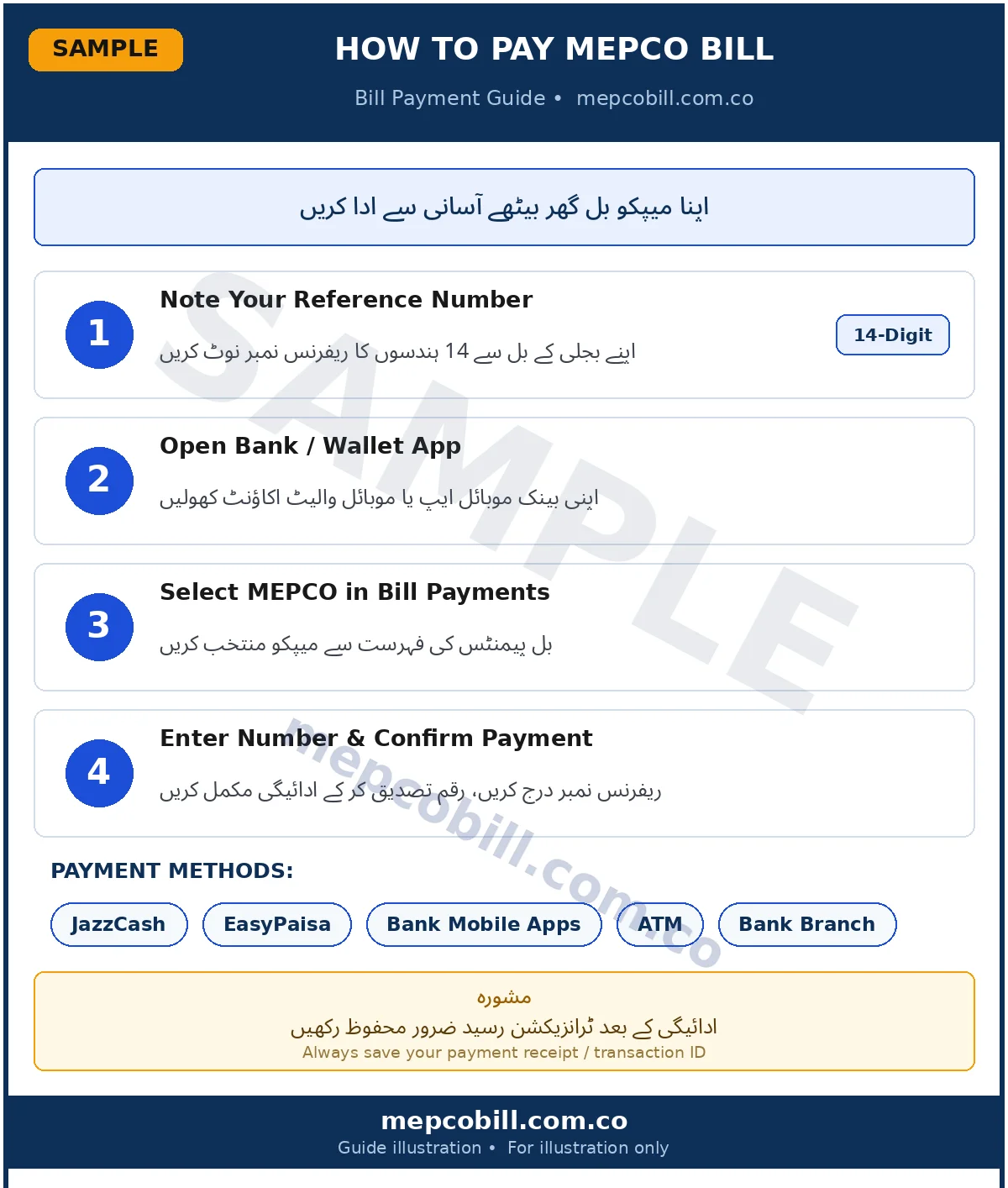
- Mobile Wallet Apps (JazzCash & EasyPaisa): Open app → Select 'Bill Payment' → Select 'Electricity' → Choose 'MEPCO' → Enter 14-digit Reference Number → Confirm PIN to pay instantly.
- Internet Banking Apps (HBL, UBL, Meezan, Bank Alfalah, Allied Bank): Login to mobile banking → Navigate to Utility Bill Payments → Add new biller MEPCO → Verify bill amount & pay.
- 1Link ATMs: Insert debit card at any 1Link ATM machine → Select Utility Bill Payment → Enter Reference Number → Authorize payment.
How to Pay MEPCO Bill Online via Bank Apps & Win Prizes (Raast Lucky Draw Guide)
With the rapid digitalization of financial services in Pakistan, paying your Mepco Bill online has become not only instant and fee-free but also rewarding. State Bank of Pakistan (SBP) via the Raast Instant Payment System and major commercial banks (such as HBL, Meezan Bank, Bank Alfalah, Allied Bank, JazzCash, and EasyPaisa) frequently introduce seasonal promotional campaigns, cashbacks, and monthly lucky draws for customers who settle their utility bills digitally.
🎁 Pro Tip / Bank Rewards: Paying your MEPCO electricity bill through your registered bank's mobile app or Raast P2M/1Bill channel makes your transaction eligible for active bank promotional draws, instant cashback vouchers, and reward points!
Key Information About Raast & Bank App Bill Payment Promotions
- Instant & Zero Processing Fee: Payments conducted via Raast and 1Bill endpoints are processed in real-time with zero hidden transaction fees.
- Bank-Specific Lucky Draws: Commercial banks periodically launch marketing campaigns offering prizes (such as cash rewards, smartphones, and motorbikes) to users who pay at least one utility bill per month via their mobile banking application.
- Automatic Entry: In most bank promotional campaigns, simply completing your MEPCO bill payment using your 14-digit Reference Number automatically registers your transaction ID into the bank's active monthly lucky draw.
Step-by-Step: How to Pay MEPCO Bill via Raast & Bank Apps to Win Prizes
⚠️ Security Alert & Anti-Scam Warning: Never share your bank account PIN, OTP, or CNIC details with unverified third parties or callers claiming you have won a "Raast Lucky Draw". Always check your bank's official mobile application or verified social media channels for legitimate campaign announcements.
MEPCO Customer Care, Helpline, & Online Complaint Registration
If you experience unscheduled load-shedding, line faults, transformer burnout, low voltage issues, or incorrect meter reading entries, you can lodge an official complaint using the following channels:
- Toll-Free Emergency Customer Helpline: 0800-63726 / 118
- MEPCO Head Office Multan Telephone: 051-9252937 / 061-9220311
- Online Complaint Management System (CCMS): Register complaints online at
ccms.pitc.com.pk - Federal Electricity Ombudsman (Wafaqi Mohtasib): For unresolved billing disputes or overcharging complaints.